Appliance Care
Washer Won’t Drain or Spin: A Symptom-by-Symptom Intake Guide
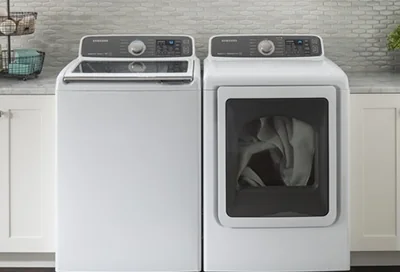
When a washer won’t drain or spin, start by describing what remains: visible water, unusually wet laundry, or a cycle that stopped before finishing. These observations help explain the problem without guessing which part failed.
Use this guide to organize what you already noticed. You do not need to run another cycle, move the appliance, or open anything to complete the intake notes.
First, separate a service concern from an immediate hazard
Stop using the washer if there is a leak, burning smell, smoke, sparks, or violent movement. Keep people away from the affected area. Samsung’s appliance safety guidance calls for stopping use when an appliance malfunctions or produces a burning smell or smoke, and for seeking service when a washer leaks.
If water has reached electrical connections, do not approach the plug or touch the washer. The U.S. Consumer Product Safety Commission warns against touching wet appliances that remain connected to electricity. For smoke, fire, or immediate danger, leave the area and contact emergency services.
A locked door is also a boundary: do not pull it open, defeat the latch, or use an emergency release to inspect the load. Leave trapped water and laundry for model-specific professional guidance.
Follow this observation-only decision tree
Start with the safety check above. If there is no immediate hazard, follow the first branch that matches what you can safely see:
- Is water visibly pooled inside the washer? Yes → use Branch A. If the view is blocked or the lid remains locked, record “water level unknown.” Do not open the machine just to answer.
- No pooled water is visible, but clothes are wetter than usual? Use Branch B. This describes the result; it does not establish whether draining finished correctly.
- Did the basket begin spinning, then slow or stop? Add Branch C to your notes, whether or not water remains.
- Is a code, blinking-light pattern, or lock symbol showing? Record it alongside the matching branch. Use the code section below.
More than one branch can apply. “Water remains and spinning stopped” is more useful than choosing one symptom and leaving out the other.
Branch A: Water remains inside
Record where you can see the water: across the bottom of the basket, against the door glass, or partly hidden beneath the laundry. Use plain descriptions rather than trying to measure depth. If the view is unclear, say so.
Note the last stage shown on the controls and whether the display indicated that the cycle had ended. Also record any sound you already heard when the machine stopped: humming, clicking, intermittent operation, or silence. A sound alone cannot identify a failed pump.
Drain and spin symptoms can overlap. In its no-spin guidance for Samsung washers, Samsung explains that an inability to drain can prevent the machine from advancing to spin. That connection helps explain why both symptoms belong in the same intake report; it does not prove a particular fault in your washer.
Do not open a pump filter, remove a drain cap, disconnect a hose, or attempt to empty the machine for this guide. Report visible water and request instructions appropriate to the exact model.
Branch B: No visible pool, but laundry is unusually wet
Record the cycle name and selected spin setting if they are still visible. Include whether the load contained everyday clothing, sheets, a blanket, or a few heavy items. Describe the load from memory rather than opening a locked washer to inspect it.
Whirlpool’s spin guidance for stacked laundry centers explains that lower spin speeds remove less water. A low-spin selection can therefore help explain wet laundry, but the setting should be interpreted using your model’s manual and the garment care instructions.
Separate what you observed from what you assumed. “Clothes felt wetter than on the same cycle previously” describes a change. “The motor is broken” assigns a cause that has not been established.
If the clothes remain inaccessible, report their condition as unknown. There is no need to force access or start another spin cycle to make the intake more complete.
Branch C: Spinning began, then stopped or repeated
Write down the sequence you remember. Did the machine turn slowly, begin a faster spin, pause, and return to slow movement? Did the remaining-time display change? Was there unusual vibration before it stopped?
Samsung’s poor-spin guidance identifies load imbalance as one possible reason for slow spinning, interrupted spinning, and wet clothes. Those symptoms still require context; they do not establish that the load is the only issue.
Record whether this happened with one bulky item or across several previously used loads. Use only history you already have. Do not run comparison loads, hold the cabinet steady, adjust the feet, or reach behind the washer to investigate.
If movement became violent, return to the safety boundary and leave the washer unused pending assessment.
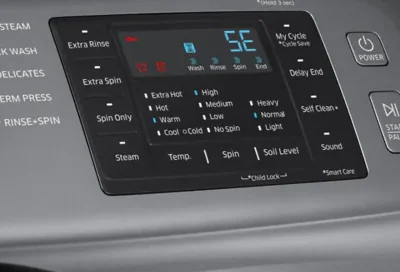
Preserve the exact display message
Photograph the display from a safe, dry position if it is accessible. Include the letters, numbers, capitalization, and any flashing indicators. For a washer without a digital display, identify which labeled lights blink together.
Avoid translating a code through a generic list before recording it. Samsung’s washer error-code reference notes that “dc” can indicate either a door issue or an unbalanced load, depending on the model. The same reference warns against trying to open the door while the door-lock indicator is lit.
Do not clear the message with repeated power cycling, button combinations, calibration modes, or resets. Keeping the original message in your notes gives the person reviewing the request useful context.
Turn the observations into a service request
Use the before-you-schedule appliance repair guide for broader appointment preparation. For this washer concern, gather:
- Brand and model from existing paperwork or an accessible label; leave inaccessible details unknown.
- Front-load, top-load, stacked, or combination configuration.
- Matching branch, visible water condition, and whether laundry remains trapped.
- Cycle, spin setting, load contents, and exact display message.
- When the symptom began and whether earlier loads showed the same behavior.
- Any leak, unusual sound, recent installation, move, or known power interruption.
An illustrative intake note could read: “Front-load washer stopped during the towel cycle. Water is visible through the glass, the door remains locked, and I photographed the display. I have not restarted it.” This is an example, not a customer case.
Review the washer repair service information, then contact LA Appliance Repair Pros with your notes. Ask whether your model and address are within the current service scope and what diagnostic terms apply. The observations support an assessment; they cannot establish the repair, price, or appointment availability.